Looking for an alternative to Adobe Photoshop? Explore the options below and open each software profile to find out more.
Compare platforms, features, and licensing with your needs. Always check current pricing and product details on the official website.
Quick Comparison
Overview| Software | Platform | Similarity to Adobe Photoshop | License | Download / Use |
|---|---|---|---|---|
| PhotoCraft | Windows / macOS / Linux / Web Browser | 98% | Open Source | Visit website ↗ |
| Krita | Desktop | Not rated | Open Source | Visit website ↗ |
| Photopea | Web Browser | Not rated | Freemium | Visit website ↗ |
| GIMP | Desktop | Not rated | Open Source | Visit website ↗ |
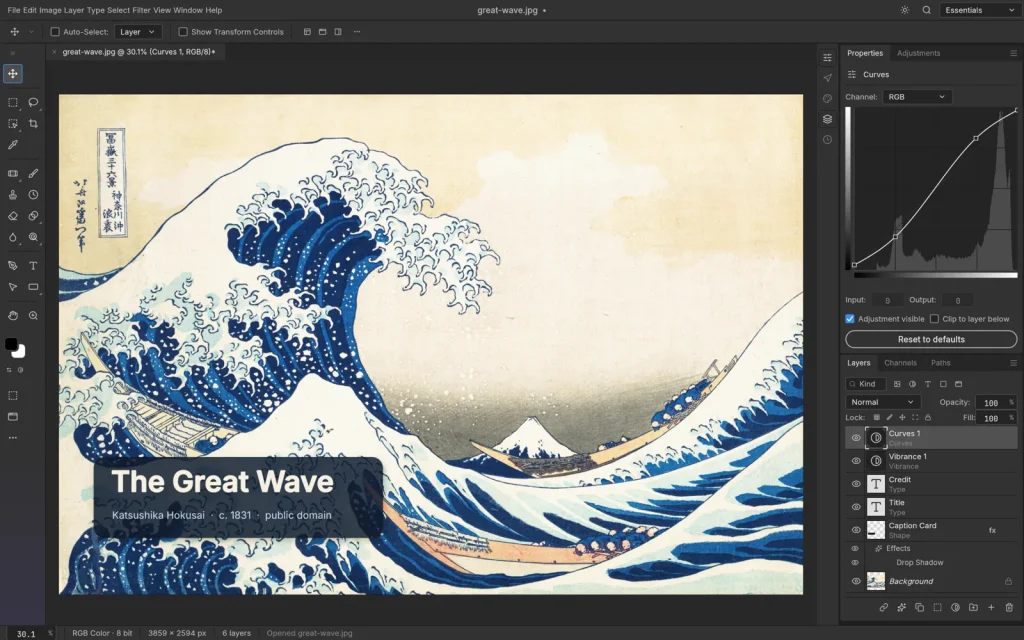
PhotoCraft is a free, open-source image editor with a familiar layered workflow and native desktop builds.
Explore the full profile for supported platforms, key features, screenshots, and official downloads.
Pros
- Familiar layer-based editing
- Native desktop application
- Free and open source
Cons
- Test compatibility with your existing workflow
- Web build requires self-hosting

An open-source digital painting application for illustration workflows. It does not replace every Photoshop feature.
Pros
- Tools focused on brushes and illustration
Cons
- Its workflow differs from dedicated photo-retouching software
A browser-based image editor to explore as an alternative to Photoshop.
Pros
- Runs in a web browser
- Supports PSD workflows
Cons
- Performance depends on browser resources and document complexity
An open-source image editor to explore as an alternative to Photoshop.
Pros
- Open-source software
- Extendable with plug-ins
Cons
- Allow time to learn its interface and workflow
Frequently Asked Questions
How do I choose the right alternative?
Compare your workflow, platform, file formats, and licensing needs. Open each software profile for more details.
Do these tools offer exactly the same features?
Features vary between tools. Test an alternative with a sample project before moving your workflow.
Leave a Comment